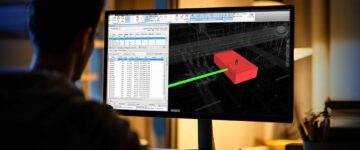


- If interdisciplinary clashes are not found and resolved in the early design phase, site risks and cost overruns are hard to avoid.
- As a consultant, you need a well-defined clash detection process in place to remove clashes and maintain project stability.
- Running clash resolution in Navisworks is much more than a technical routine, but essential for project handovers.
Table of Contents
Design clashes and errors lead to delays and cost overruns. This is an incontrovertible fact every construction consulting firm is aware of. But there are many who are still sticking to legacy workflows due to lack of staff expertise or resistance, or plain lack of learning time.
But we feel it’s now necessary for you to take the step and switch from 2D drawings to 3D models.
Let’s make the issue easier for you to understand.
You will face continuous difficulties if you do not adopt new tools and workflows. What 3D models offer in terms of information is much richer than what 2D drawings offer. In 2D based workflows you will find errors at almost every project stage, and they can cascade and multiply creating untenable situations.
The outcome – greater costs and delays. In the next paragraph, we see how clash detection in BIM points out conflicts and resolves them.
What is clash detection in BIM?
Taking advantage of clash detection in BIM can solve a major part of your problems. But, first we need to talk about the meaning of clash detection. It’s simple to understand – lets dive in. Every trade creates their own model from 2D drawings that are provided by the client. For example, architects create a model, structural engineers create another, and MEP specialists build their own. Now, we need to bring all the models together and combine them into one.
What happens when 3D models are coordinated? When the MEP models are set into the layout of architecture and structure, they tend to mismatch. Elements in the model do not align and work with one another. This is where interdisciplinary clashes start to occur. Ducts running into beams, not enough maintenance access, and workflow clashes are examples of clashes. There are hundreds of other clashes, but we have mentioned just a few here.
From our experience, Navisworks helps consultants erase clashes. The software detects and classifies them. Once that is done, team leaders can assign tasks to resolve them in Revit. The model gets refined with multiple clash tests until it is free of issues. Moving onto how it can help a consultant manage design risks before site work begins.
Even this concept is easy to work around. When all the clashes are removed and it passes quality control tests, the 3D model is said to be construction ready. When the 3D model and extracted documentation is taken on the site, it is free of issues, which reduces risks for onsite personnel.
Remove clashes before they become site problems.
Let’s build clean models together.
Why clash detection matters for consultants?
From experience, we consultants have to keep our 3D models clean, clear, and built for purpose. If a small error goes unnoticed, it leads to cost problems. We need to be careful in how we review designs and keep the project secure from risks. Every 3D model should advocate constructability as it builds trust during the job.
Embracing clash detection early is crucial. Using clash detection processes and tools brings teams together. When a 3D model flags an issue, everyone can view it on a virtual screen, filtering confusion and enabling collaborative resolution. This process becomes more effective when you understand how MEP clashes are detected in BIM, especially across multiple disciplines.
Teamwork makes the design tight and prevents the need to address the issue many times. Over time, the overall project becomes efficient and the work gains higher momentum.
Diagnosing clashes early prevents costly rework and claims for consulting firms. When surprises on the site are minimal, the stress is released and delays take a back seat. Each issue that is fixed in the model means fewer chances of problems on the site. Once a clash report is generated, it will help you track what was resolved, when, and by whom.
As a consultant when you deliver a coordinated design that performs as planned, it builds trust. It shows expertise and an eye for quality. Handovers are swift and the client stays happy. As the word spreads, it creates a strong reputation for you as a consultant. Here’s a breakdown of how BIM-based clash detection can reduce risks.
Types of clashes found in a 3D BIM model
Clashes in a 3D model are classified and resolved based on their severity. Once a conflict is highlighted in Navisworks, it is given to the right people for resolution in Revit. Here’s a breakdown of clash variants in a 3D model.
| Clash type | What does it mean? | How is it identified? | What are its effects? |
|---|---|---|---|
| Hard clashes | Two components occupying the same area. | Pipes running through a wall or beam. | Halts construction and requires redesign. |
| Soft clashes | Elements gets close and do not satisfy spacing protocols. | Electric cables near ducts or sprinklers. | Leads to safety problems. |
| Clearance clashes | Not enough spacing or clearance for maintenance. | Pumps are placed close to a wall. | Hinders maintenance and creates issues in operations. |
| Workflows clashes | Data or team views do not align. | Using outdated file versions for structural and MEP models. | Causes confusion leading to delays. |
| Scheduling clashes | Construction timelines do not match with each other. | Installing equipment before the space is set for it. | Impedes project progress and causes issues with coordination. |
Clash-free 3D MEPF model for an airport project.
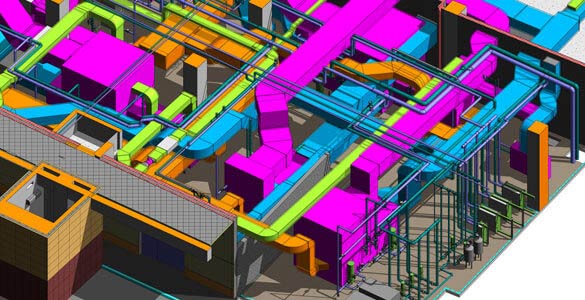 Airport Plantroom MEP System
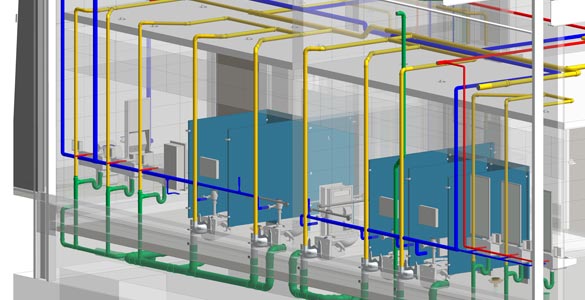 Drainage and Water Supply System
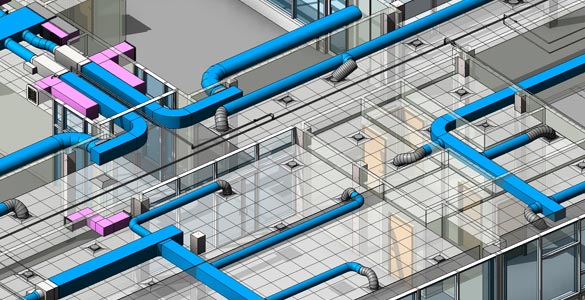 Office Building MEP System
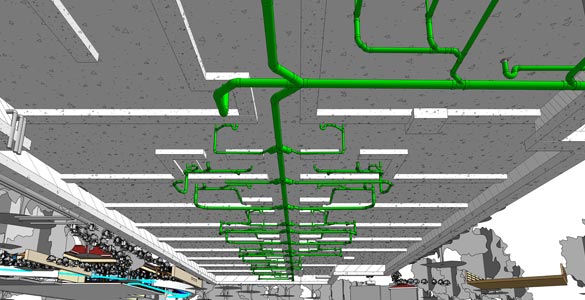 Under Ground Drainage System
A client from the Middle East approached us for an airport terminal project. They required the terminals to be operational before the inaugural timeline. Architectural, Structural, and MEPF work for multiple terminals had to be planned and it was a challenge to sync MEPF designs into the architectural and structural layout.
The team of BIM experts at HitechDigital created a coordinated and clash-free model at LOD 400 in Revit. We clashed the model in Navisworks to remove any conflicts. Once that was complete, our team resolved constructability problems and performed quality checks to make the 3D model accurate and reliable. Desired deliverables including clash reports and Quantity Takeoffs were also extracted from the model.
The results were:
- Cost and time savings in MEPF installation
- Completion of the terminal with 100% systems installed
- Reduction in change orders
How early clash detection lowers preconstruction risks?
The quality of the 3D model determines the effectiveness, cost, and timeline of the project. When consultants adopt clash detection, it breeds various benefits. Here’s a snapshot of each benefit explained.
Realize minimal design issues
We have covered a lot of ground in the above discussion, but we’ll begin again on how clash detection reduces project risks. We begin with reduction in design problems. It’s all about resolving conflicts during the preconstruction phase. Once the 3D model and extracted documentation including shop drawings, construction drawings, etc. are error free, the design issues reduce automatically.
Prevent a cost and schedule overload
We witness schedule and cost overloads when the 3D model is filled with clashes that cause rework. When all the clashes are resolved in the 3D model, it leaves no scope for rework on the work site. That means the construction process becomes seamless for you and people working on the site.
Facilitate team collaboration
Consultants know the importance of collaboration at an early stage. From our experience and expertise, we regard collaboration as an important process. When participants come together at an early stage, it makes communication swift across every phase. Files stored on platforms like BIM 360 also facilitates sharing and editing that aligns everyone to a common goal.
Boost construction safety
Safety on the site is paramount for people working there. A coordinated 3D model along with drawings offer visualization on every space and corner. When this happens, risks reduce exponentially. A safer site means lower claims and liabilities.
Clash Detection Workflow: Step-by-Step Process
Let’s breakdown the process on how clash detection can be done to yield maximum effectiveness for consultants.
-
Get every model in a single space
Every 3D model is connected with the other to know how they function as a collective.
-
Define specific clash rules and tolerances
As consultants you need to set rules for alignment and spacing to highlight actual problems.
-
Run automated clash detection
Tools scan models for clashes with color coding to identify and fix conflicts faster.
-
Focus on clash reviews and categorization
You need to check every clash and group them by type as major ones need resolution first.
-
Hold clash resolution meetings
Talk with other teams to review and close clashes ensuring accountability and teamwork.
-
Update the model and validate it
After the clashes are fixed, upload the updated models for review and validation by the client.
Best practices for BIM coordination and design validation
As consultants, we feel BIM coordination gets all the 3D models in a single location to resolve conflicts. On the other hand, design validation makes sure the final model adheres to codes, client requirements, and safety needs. We feel the need to make sure you understand the best practices to achieve the former and latter.
1. Keep your models accurate and updated
Use the latest design files as outdated models are prone to design errors and clashes.
2. Use standardized naming and file rules
Follow consistent standards and file naming to help teams gain clarity and speed.
3. Run frequent clash tests at various stages
Check for conflicts at each design change as it prevents rework and saves valuable time.
4. Hold review meetings with every trade
Gather every discipline to discuss clashes as shared inputs improve model coordination and precision.
5. Facilitate strategic tracking and resolution of clashes
Utilize interference tracking tools as they can help you assign each clash to the right team.
Conclusion
As we reach closure, we can easily conclude the importance of clash detection for consultants. For large and complex projects, we have to be relentless in adopting BIM coordination and validation. Each capability offered by clash detection in BIM creates a design and construction roadmap which removes guesswork and ensures all involved in the project are aligned.
As design and construction technology improves, the use of clash detection processes and tools will be a core necessity. A strong focus on accuracy, data validity, and quality will be key to achieving winning and profitable outcomes.
Catch conflicts that drain costs, hours, and your patience.
Resolve them quickly and watch your project breathe better.