

- 2D drafting is mainly used in construction for digital floor plans, elevations and sections.
- AutoCAD is a tool of choice for architects and contractors for creating standardized and dimensioned drawings.
- More so, using reusable templates for construction design increases precision and reduces rework.
Table of Contents
- How does 2D CAD drafting add value for architectural projects?
- What are the types of architectural CAD drafting and documentation and their roles?
- How does architectural drafting impact building stages?
- Success Story: Creating approval drawings for 500+ residential units saves costs
- Frequent 2D drafting challenges that result in rework and delays
- When does CAD drafting for architecture outshine 3D?
- 7 best practices for architectural drafting and drawings
- Success Story: GFC drawings for a data center project reduces design disputes and construction gridlocks
- CAD drafting vs BIM in modern architecture: Two sides of the same coin
- Conclusion
Introduction
Technical documentation including floor plans, elevations and sections and other 2D drafting today are created mainly in AutoCAD. These 2D drawings contain precise measurements and symbols for spatial layouts which help architects and consultants get faster approvals.
Although there has been a huge increase in the use of 3D modeling, 2D drafting is still an important part of any building project. From ease of portability, increased clarity and adherence to regulatory compliance, 2D drafting is simple and helps contractors with dimension referencing on site.
The principal difference is that now often, in BIM enhanced workflows the 2D drawings you see are mostly extracted from 3D models. As data complexities are reduced through 2D drawings, it becomes simpler for architects and contractors to use building codes. This article discusses the importance of 2D CAD drafting for construction projects.
How does 2D CAD drafting add value for architectural projects?
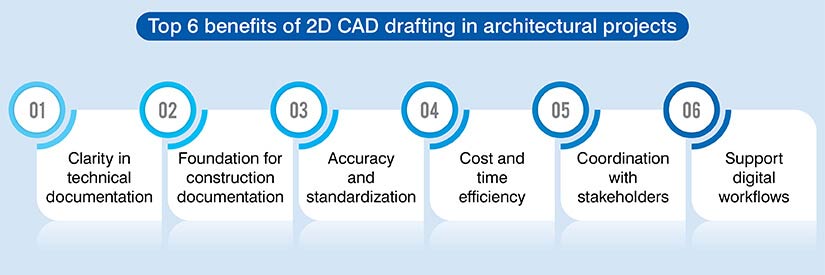
Every building project requires precise data within elevations and floor plans. Also, architectural drafting is used for coordination and regulatory compliance. Mentioned below are the benefits of 2D drafting for architectural projects.
1. Clarity
2D CAD drafting ensures you get precision and clarity using dimensions and line weights. Also, when your team uses perspective views, it can distort proportions. But, 2D drawings provide technical data and scale details with precision.
2. Efficiency
Architects use 2D CAD drafting to streamlines workflows and get higher project efficiency. You can sketch and modify layouts faster than 3D modeling. As it is a foundational standard, multiple teams can collaborate without the need of specialized software. It also ensures revisions are processed faster keeping project schedules on track.
3. Communication
As 2D drawings are easily accessible and understood, they ensure faster communication between stakeholders. A flat format makes printing easy. Also, you can annotate and markup drawings during design reviews. This level of accessibility prevents misunderstandings and ensures project notes are conveyed.
4. Documentation
Technical drawings are necessary for your team to get building permits and approvals. More so, they serve as legal records to establish accountability for standards and safety.
You can even maintain structured documentation and ensure official code requirements for the overall building lifecycle.
5. Cost
Lower software licensing and hardware costs help small to medium sized firms compared to 3D modeling counterparts. Your company can access these systems on standard and less powerful machines. As it is cost effective, it is increasingly being adopted by a larger audience range.
6. Versatility
As a drafting professional, 2D CAD drafting helps you create site plans with elevations and sections. More so, it streamlines 3D modeling tools to create complex geometries. When you combine these systems, they ensure 2D outputs remain an important element of architectural design.
Make your projects seamless with accurate architecture CAD drafting.
Get specialized drawings delivered quickly for projects
Types of architectural CAD drafting and documentation and their roles
If you are an architectural firm, CAD drafting can help you convert creative ideas into reality. Each drawing plays an important role in defining dimensions and ensuring structural integrity of your project.
| Drawing type | Role |
|---|---|
| Floor Plan | The top view shows walls, doors, layout, and dimensions. |
| Elevations | The vertical view shows building interiors and exteriors. |
| Sections | It shows cut-through views for levels and internal structure. |
| Site Plans | It shows the overall layout of the surroundings and landscape on the plot. |
| Detail Drawings | It shows drawing close-ups of specific elements or joints. |
| RCP or Reflected Ceiling Plans | It shows the ceiling layout for fixtures, lights, and other services. |
| Construction Drawing Sets | It shows the entire set of drawings required for building execution. |
How does architectural drafting impact building stages?
- During the early stages of design, these drawings outline layouts and expedite approvals. Also, spatial understanding and decision-making is improved when the framework is precise.
- It also helps carry out massing studies. Thus, visual clarity and planning is augmented when architectural drafts are developed and incorporated at various project phases.
- During design development, 2D drafts eliminate spatial flaws and simplify concepts which make decision making better. Plus, if you can add the right alignment, dimensions, and proportions, it produces precise sections and elevations.
- Your firm has to maintain visual consistency for project documentation. Drafting teams using precise instructions and specifications can augment contractor coordination. More so, aligning requirements and resolving clashes reduces errors and even ensures compliance.
- Furthermore, if you use 2D CAD drafting for your project, it enables quick revisions to modify elements or lines without updating 3D space. This helps stakeholders speed up design changes and improve client feedback.
- Your team can build a geometric foundation for 3D BIM workflows and create data-rich 3D models. They act as connecting agents between spatial designs and flat plans which ensure technical continuity. Each architectural drawing type plays a specific role at different building stages from site plans in early design to construction drawing sets during execution.
- When construction starts, these documents optimize coordination and minimize errors on the field. Hence, the deliverables are high quality and construction commences without any problems.
Creating approval drawings for 500+ residential units saves costs
A well-known architectural firm from the USA contacted the team at HitechDigital. 500+ residential units had to be built in California. They provided specialists at HitechDigital with architectural and electrical drawings that had to be converted into approval drawings.
Once the input was sent in a compatible .dwg format, approval drawings were developed in AutoCAD. They were laced with precise scales, layering, and line weight. Also, RFIs helped both the teams communicate better and resolve issues. After approval from the client, the drawings were sent for city approval.
Thus, handing over deliverables to the client led to:
- Higher cost efficiency.
- On-time project completion.
- 95% FTR deliverables.
Frequent 2D drafting challenges that result in rework and delays
2D drafting is not an easy process and requires complete attention to detail. Furthermore, it can be time-wrenching if it is done incorrectly. Even the smallest flaws can detail approvals and cause costly setbacks.
More so, the absence of proper annotation and symbols restricts visualization for stakeholders on the field. For example,
- Symbols and flat lines cannot show depth or material realism causing static perspectives.
- You need to assemble multiple views which produces misinterpretation of non-linear geometries.
- Manual updates across elevations and sections increase data error risks.
- Scales and technical symbols produce communication barriers, which makes it difficult for stakeholders to understand design
When does CAD drafting for architecture outshine 3D?
There are stages within architectural projects where CAD drafting is a suitable option. When accurate dimensions and technical details are required on the field, 3D models are not the required choice. Architectural documentation works for quick revisions, regulatory approvals, and communication purposes.
Also, if a construction project is small and cost restrained, drawings are a good option. Other reasons why 2D drafting is preferred includes speed, clarity, and practical architectural data.
More so, if the project is complex and large, stakeholders should lean toward 3D models. If your drafting experts convert drawings into 3D models, it encourages team coordination. You can even detect and resolve conflicts before onsite work starts.
Finally, a balanced strategy dictates using 2D drawings and 3D models together. When they are combined, it improves planning and collaboration along with precision.
7 best practices for architectural drafting and drawings
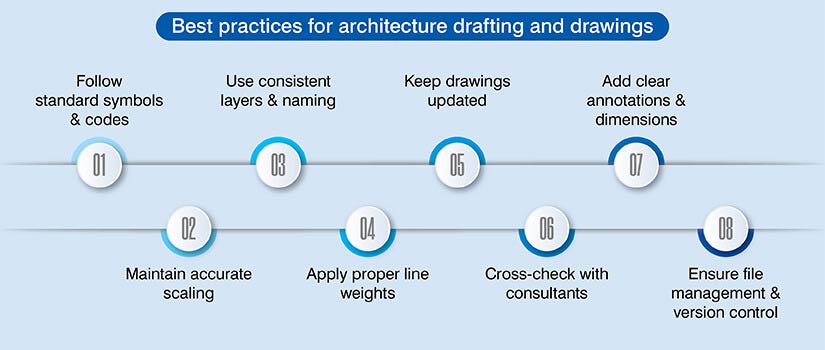
In the above sections, many aspects of 2D drafting are elaborated clearly. Yet these drawings have to be developed with accuracy and clarity. Mentioned here are 7 best practices that can help architects and engineers bring out the best in architectural drawings.
- Standardize notations and symbols.
- Use scales.
- Apply styles and formats.
- Add line weights and layers.
- Update modifications.
- Perform reviews.
- Validate inputs.
GFC drawings for a data center project reduces design disputes and construction gridlocks.

An architectural company that specializes in technology building across the USA partnered with HitechDigital for a data center building. Their requirements included GFC, fabrication and installation drawings for structural members and MEP elements for a data center building.
Multiple files from numerous disciplines were shared with the team. But, due to some ambiguities, multiple RFIs had to be raised to clarify doubts. Even interdisciplinary clashes had to be resolved, and AIA standards had to be incorporated for uniformity.
After analyzing all the details, a fully coordinated Revit model was made. It was clash tested and sent for approval from the client. Once the model was approved, the team quickly extracted IFC, fabrication and installation drawings for the client.
When the deliverables were handed over to the client, it led to:
- Faster approvals.
- Efficiency improvements.
- Better planning.
- Hassle-free installation.
- Improved drawing readability.
CAD drafting vs BIM in modern architecture: Two sides of the same coin
This is a topic of debate for every stakeholder involved in construction. But modern architectural and design firms feel CAD drafting and 3D models need to be used together. There is no need to battle as CAD will facilitate accurate drafting and documentation, whereas BIM will handle visualization and coordination for stakeholders. As you incorporate both in your project workflow, it will deliver efficiencies at scale.
Conclusion
As this article comes to an end, it can be safely said, 2D drafting in architecture adds value and here to stay for every stakeholder. More so, it will foster a foundation for architectural firms to receive quick permits and precise construction documentation.
Architectural drafting integrated within 3D BIM is not a choice, but a necessity that will ensure accuracy, clarity, and speed for architecture and building.
Upgrade your design workflows with customized CAD solutions.
Partner with us for precise and build-ready architecture CAD drawings