
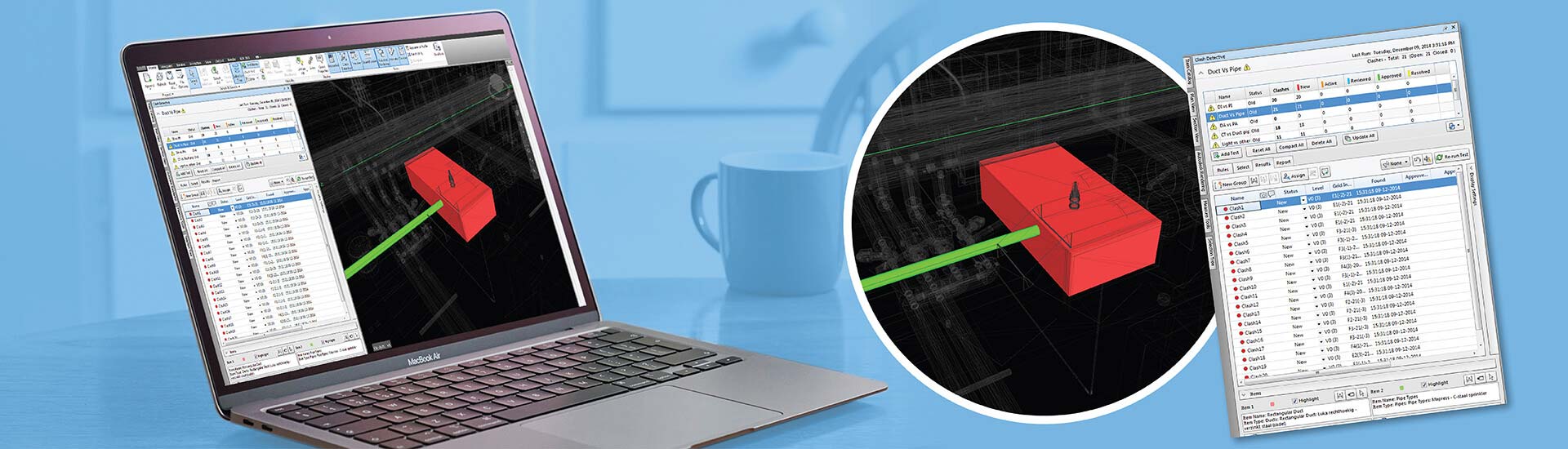

- Clashes between disciplines like architecture, structure and MEP result in costly rework and project delays.
- If clashes are identified and resolved in the 3D model during the preconstruction stage, then on-site changes, material waste and setbacks can be prevented.
- Using tools like Navisworks for BIM clash detection and Revit to make the necessary design changes ensures accurate clash detection.
Table of Contents
- Understanding BIM clash detection
- The types of clashes
- Why BIM clash detection is crucial for error-free construction
- How BIM clash coordination reduces errors and streamlines projects
- 5 benefits of BIM clash detection for construction projects
- How outsourcing BIM clash detection services benefits AEC firms
- In-house BIM clash detection vs outsourcing – a brief analysis
- A step-by-step process to perform BIM clash detection
- Integrating advanced tools with BIM clash detection in construction
- Conclusion
Poorly coordinated projects cause problems at every single phase. Architects, MEP consultants, contractors and building engineers frequently encounter MEP design inconsistencies, incomplete data, poor communication, multiple clashes and frequent design revisions. BIM clash detection helps to resolve these issues.
BIM-based clash detection minimizes errors in construction, keeping projects on time, on budget and safe. When design ambiguities show up on the construction site, it leads to expensive rework, labor issues and material waste.
This stretches budgets and causes cost overruns. Furthermore, frequent issues can hurt a contractor’s reputation and erode client trust. Reducing errors helps our clients use and manufacture high quality deliverables. That is what ensures long-term performance and better outcomes.
BIM provides precise clash detection with advanced workflows and powerful tools like Revit, Navisworks and BIM360.
Based on a study, as construction projects are delayed by 20%., time-driven costs are elevated by 20%.
MEP teams can find and fix clashes early in the design stage, while visualizing a 3D model on a cloud platform like BIM 360 for clash coordination, ensuring that everyone has access to the latest files.
This makes design and fabrication error free and helps speed up the installation at the construction site.
This article explains how BIM clash detection helps stakeholders make their projects better and more efficient.
Understanding BIM clash detection
When you bring 3D models at a specific LOD together into a single model, you have to check for conflicts. Once these early clashes are resolved, the 3D model is ready for extracting documents and drawings.
What is BIM clash detection?
BIM clash detection involves identifying and removing interdisciplinary clashes from a 3D model. Architects, designers and engineers use tools like Navisworks to flag conflicts in 3D space before they become real problems on site.
Coordinating a BIM model in Navisworks helps to see every component, corner, system and clash. This gives us a complete snapshot of all clashes in reports that classify them as hard, soft, workflow and so on.
The types of clashes
There are various interferences in BIM clash coordination – hard, soft, workflow, code and operational clashes. It is important to understand the 5 types of clashes to get a better understanding of BIM based clash detection.
Hard clashes
Hard clashes occur when two or more components occupy the same space in the 3D model. A conflict would be a nightmare to fix during or after construction. For example, an air conditioning duct running through a steel beam means one of them has to move.
Soft clashes
Soft clashes occur when objects do not have enough clearance for access and maintenance. Say for example an electrical panel is installed too close to a wall. This makes it tough for technicians to get in there for repairs. It is a soft clash.
Workflow conflicts
Workflow clashes occur when the construction sequencing is wrong. For example, scheduling plumbing before the concrete pour or installing ductwork before the structural frame is up creates major sequencing problems.
Regulatory clashes
Regulatory clashes occur when we see violations of industry codes and safety protocols. If we do not catch them, they can lead to legal and safety headaches. For instance if fire sprinkler equipment is installed too far apart, it is a clear violation of fire safety rules.
Operational interferences
Operational interferences occur when a design limits maintenance or future use. An HVAC control panel above a false ceiling is a pain for engineers, who have to keep removing tiles just to get access.
Why BIM clash detection is crucial for error-free construction
Pre-emptive clash detection is the denominator of success in modern design and construction. If conflicts go unchecked during design, they create costly rework and delays for clients. But when we remove clashes during preconstruction, the 3D model becomes a goldmine.
Participants can extract accurate, consistent and data driven documentation like BOMs, BOQs, BBS, fabrication drawings, installation drawings and other key deliverables.
Clash coordinated fabrication drawings make sure every building component is manufactured with high precision and quality. Meanwhile, installation drawings help field teams put construction components and equipment in correct locations, making clash detection in design coordination crucial for all stakeholders in the construction field.
Eliminate costly clashes before they impact your project timeline.
Explore HitechDigital’s BIM clash detection services.
How BIM clash coordination reduces errors and streamlines projects
Getting every stakeholder from architecture, structure and MEPF onto a single platform is what helps projects achieve seamless BIM clash coordination.
Purpose of clash coordination meetings
Holding clash coordination meetings early in the design stage are crucial as they let architects, engineers and contractors flag and resolve interferences before anyone steps on site. These meetings ensure that all building systems are aligned and free of clashes between architecture, structure and MEP trades.
Also, getting collaborative feedback on a platform like BIM 360 cuts down on RFIs and change orders. It also reduces onsite changes, which helps the project stay on schedule and improves overall constructability.
Use of tools like Revit and Navisworks to create and audit 3D models
Architects, designers, engineers and other construction team members use popular BIM tools like Revit and Navisworks to build and check 3D models. They then combine the individual 3D models from each discipline into a single, data rich model. That combined model has to be clash checked before we can use it in later project stages.
Once a detailed clash report is generated, 3D modeling teams can make the needed changes in Revit. Then they check it again for any new conflicts. Applying extra layers of QA/QC helps validate the 3D model for accuracy and data integrity.
Adopting a Common Data Environment (CDE) for seamless coordination
A Common Data Environment, or CDE, is a crucial tool. It helps multiple stakeholders save, access and share project models, drawings, documents, images and other files on one central platform. This helps everyone use the most up to date information, which reduces risk down the line.
Real time access and version control leads to faster clash coordination, greater clarity and integrated project workflows. All of these, ensure that projects are streamlined, resulting in an error-free construction process.
5 benefits of BIM clash detection for construction projects
BIM clash detection offers everyone on the project efficient and long-term benefits, ensuring quick and error-free construction.
Eliminating rework and reducing costs
By coordinating 3D models from multiple trades, preemptive clash detection gets rid of rework early in the design stage. Detailed clash visualization and removal helps manufacturing teams and job site crews with seamless fabrication and installation. Eliminating that rework speeds up construction, which saves both time and money.
Enhanced team communication
Teams can use visualization to improve communication. Getting stakeholders involved early also promotes efficient collaboration. And using a CDE or a cloud tool like BIM360 makes sure every team is working with the latest files.
Reducing construction risks
Risks on construction sites can be catastrophic putting people’s safety on the line. Removing clashes quickly gives us a clean 3D model that helps visualize hazardous areas, reducing construction risks. Immersive 3D representations also help stakeholders spot risks and resolve them faster.
Lower material waste
Ordering too much or too little material causes big cost swings from the budget. But stakeholders can use the coordinated, clash free 3D model to get precise quantity takeoffs with BOQs and BOMs linked to component pricing. We can even use several Revit or Navisworks extensions to calculate accurate costs for every single building element.
Faster approvals and handovers
Projects get faster Turnaround Times (TAT) with quicker approvals from local authorities and fast handovers to clients. When we send a clash free 3D model to the client for feedback, it improves their decision-making. Once it is approved, a QA/QC check is run on the model for data integrity before using it in other project phases.
How outsourcing BIM clash detection services benefits AEC firms
BIM clash detection service providers can help AEC firms eliminate time and cost nightmares. They thoroughly review all client inputs to create a coordinated and clash free 3D model at the required LOD.
In fact, BIM clash detection and coordination service providers offer a range of customized solutions for each project. This includes BIM model reviews and validation, clash coordination and resolution, MEP coordination drawings, precise scheduling and cost estimates. This is what you should expect from a good BIM clash detection partner.
A proven checklist to work with the right BIM clash detection partner
Outsourcing clash detection means you need to be careful. We’ve put together a proven checklist for our clients to help them verify a partner’s expertise and capabilities.
- Are they proficient in software like Revit, Navisworks and BIM360?
- Can they coordinate complex architectural, structural and MEP models?
- Do they have a strong track record of successful projects?
- Will they actively participate in coordination meetings and communicate issues clearly?
- Can they deliver a quick Turnaround Time (TAT) that aligns with your project schedule?
- Do they recheck the 3D models after fixing conflicts and update the design?
- Do they make sure data is integrated and secure within the Common Data Environment?
In-house BIM clash detection vs outsourcing – a brief analysis
This table shows the stark differences between doing clash detection in-house versus outsourcing it.
| Driver | In-house | Outsourced |
|---|---|---|
| Cost | Higher investment for hardware, software, and training resources. | Cost-effective with payments per project or customized deliverables. |
| Expertise and Skills | Restricted to skillset of internal team. | Greater access to BIM professionals at a global level. |
| Turnaround Time | Slower due to internal restrictions. | Faster based on dedicated resources for each project. |
| Access to tools | Minimal use of tools driven by old infrastructure. | Comprehensive use of BIM tools including automation and advanced clash detection platforms. |
| Scalability | Challenging to achieve a quick ramp-up or ramp-down of resources. | Faster resource scalability driven by project size and schedule. |
Struggling with MEP coordination conflicts and design rework?
Streamline clash detection and improve project efficiency.
A step-by-step process to perform BIM clash detection
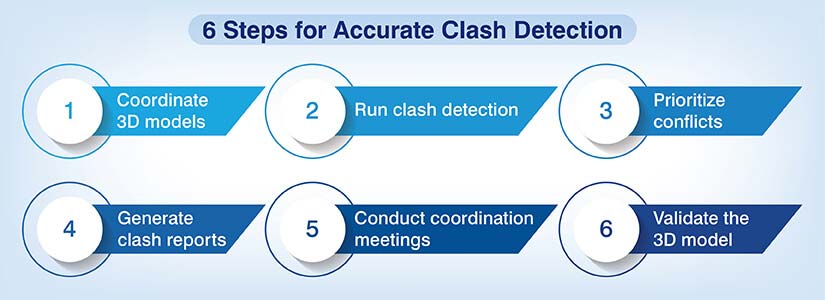
If clash detection isn’t done right, you’ll get inefficient results and even more errors. Following a step by step process is how we get higher accuracy and greater efficiency.
Step 1: Aggregate trade-specific 3D models
Once each discipline creates its 3D model from the client’s input, combine them into a single federated model.
Step 2: Do automated clash detection
Use clash detection tools like Navisworks and set up rules for element comparison and tolerance levels.
Step 3: Classify and prioritize clashes
Run the program to find and categorize conflicts into hard, soft and workflow clashes.
Step 4: Extract markups and clash reports
The Navisworks tool generates a comprehensive report. It shows the clash location, elements involved, clash severity and the team assigned to fix it.
Step 5: Hold coordination meetings and resolve issues
Hold coordination meetings to prioritize issues, assign roles, and track resolutions and any pending problems.
Step 6: Review and validate the BIM model
Validate the BIM model with multi-layered QA/QC workflows. This includes checking component placement, verifying object properties, doing alignment checks and assigning parameters.
Clash-coordinated 3D model for an airport project led to 100% installation of MEPF systems.
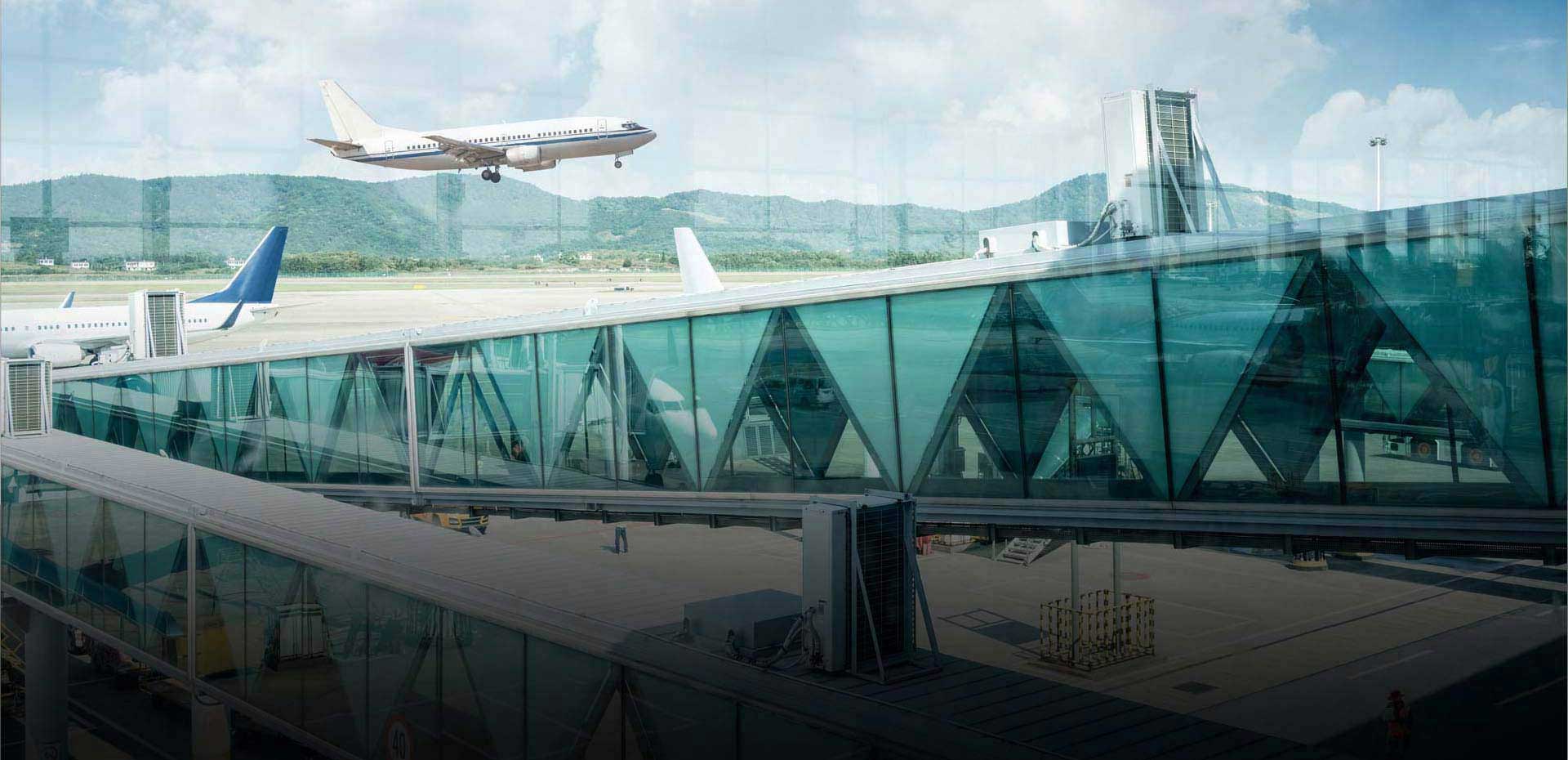
An engineering and construction company in the Middle East partnered with HitechDigital for an airport terminal project. They needed to develop multiple areas of the terminal, including passenger areas, office buildings and various tiers. The client’s core requirement was a coordinated and clash-free MEPF model at LOD 400. Our team at HitechDigital navigated associated obstacles, especially coordinating with other disciplines and resolving clashes within the MEPF trades.
We assessed the design documents to check for inconsistencies in ducts, pipes and flow rates. We then imported 2D drawings into Revit and created the MEPF models at LOD 400. Clashes were found and fixed in Navisworks, and we created in depth clash reports from there. We used the final 3D model to extract coordination drawings and quantity takeoffs. Multiple QA/QC processes were also put in place to validate the model’s accuracy. This led to:
- Time and cost savings for MEPF installations.
- Completion of the terminal with 100% installation of MEPF equipment.
- Reduction in change orders that enabled overall cost savings in MEP.
Integrating advanced tools with BIM clash detection in construction
When we reinforce BIM clash detection with advanced tools and processes, it enhances our ability to deliver high performance results for clients.
Reinforcement of AI/ML within BIM clash detection
Using AI/ML in BIM clash detection improves our data-led algorithms and rule driven coordination. By looking at historical clash data, Machine Learning can spot patterns, predict high-risk clash zones and even automate clash groups by priority. AI and ML also gets rid of manual reviews by filtering out false positives and highlighting the truly important conflicts.
ISO 19650 and BIM Level 2
BIM Level 2 and ISO 19650 give us thorough protocols for coordinating and managing 3D models. BIM Level 2 requires federated models, interference detection and clear responsibilities using a CDE. ISO 19650 builds on this by adding regular data delivery cycles, naming styles and approval channels.
For clash detection, this means standards are compared against planned data, while every issue is tracked, resolved and audited using thorough workflows. This is what gives us higher consistency, compliance and effective coordination.
Conclusion
As construction projects get bigger and more complex, architectural, structural and MEPF systems will always need BIM clash detection to find and fix conflicts fast. Timelines are tight and there are hundreds of millions of dollars on the table reiterating the need to finish projects on schedule, on budget, without errors and with a focus on high quality.
Outsourcing clash detection services will continue to help architects, designers, engineers, contractors and other stakeholder get a better ROI on their next big project.
Build smarter with clash-free BIM models.
Keep your project on schedule and within budget with HitechDigital’s clash detection services.