
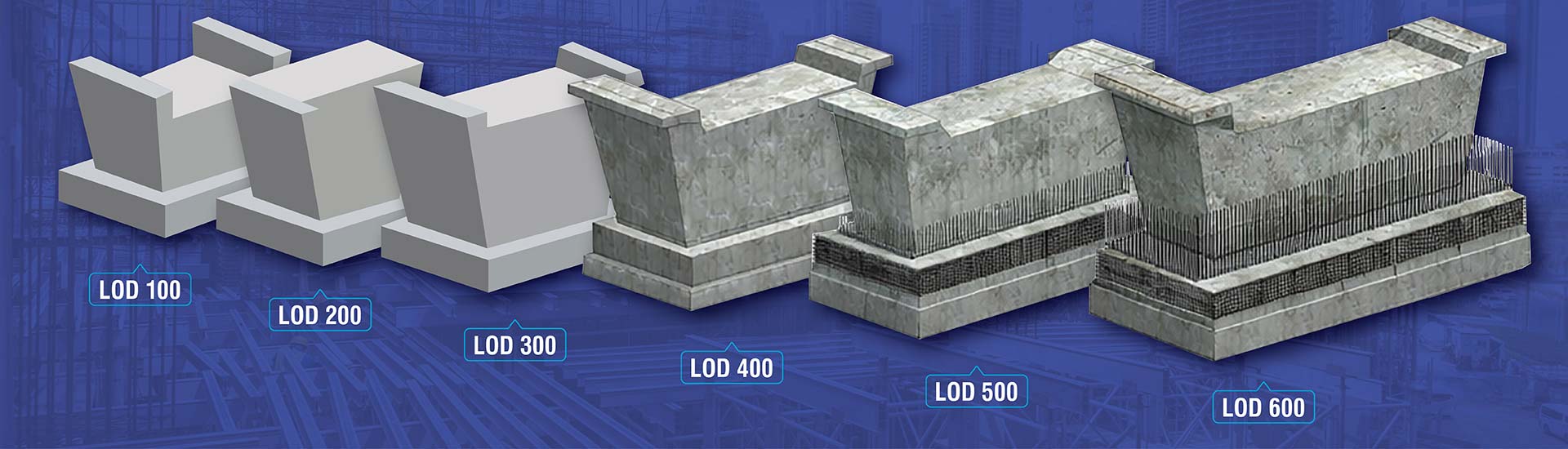

- When a specific Level Development (LOD) is not established early on, it results in coordination problems, communication issues and inaccuracies.
- Level of Development begins at the concept stage (LOD 100) and ends at as-built modeling (LOD 500) to improve coordination, communication and decision-making.
- Engineering consultants apply the required LOD to improve factors such as life-cycle costs, orientation and material use.
Table of Contents
- What is BIM LOD (Level of Development)?
- Understanding BIM LOD (Level of Detail)
- Level of Detail vs Level of Development
- The importance of LOD in a BIM project
- Understanding various LOD in BIM
- Levels of BIM in Construction: Level 0 to Level 3 Explained
- Role of Level of Detail in Revit
- How LOD impacts implementation and model performance
- Top 5 benefits of LOD in construction
- Challenges faced in implementing BIM LOD
- What is the connection between BIM LOD and regulatory compliance?
- Global guidelines for BIM at various LOD
- How does Level of Development (LOD) affect sustainable construction?
- Conclusion
Misunderstandings about building design are likely to arise if stakeholders do not focus on the correct Level of Development (LOD) during the early design phases. This is why engineering consultants need to lay out the data benchmarks to free teams from having to depend on assumptions.
Thus, it is absolutely necessary to define a specific LOD (100-500) during design development. A 3D Revit model can deliver on its promises effectively only when architects, engineers, consultants and other stakeholders agree on the Level of Development (LOD) from the beginning. A defined LOD provides greater clarity and better workflows.
The following guide focuses on understanding various LOD in BIM, Level of Detail vs Level of Development and other topics of interest for engineering consultants.
What is BIM LOD (Level of Development)?
BIM Level of Development standardizes accuracy, detail and information in 3D BIM model elements at various project phases. It tells stakeholders what a model can be used for. More so, it creates common understanding for reliability of a 3D model.
LOD changes between the concept and as-built phase. Every level sends a clear message on the required geometric detail, level of Information that needs to be included and the project decisions at specific levels.
When direct expectations are set at early stages it enables interdisciplinary coordination, accurate cost and schedules, reduction in errors and greater levels of predictability.
Understanding BIM LOD (Level of Detail)
The Level of Detail (LOD) represents graphical data or the look of an element in a 3D model. For example: size and shape. It is important as it ensures clear visualization and helps engineering consultants avoid over-modeling.
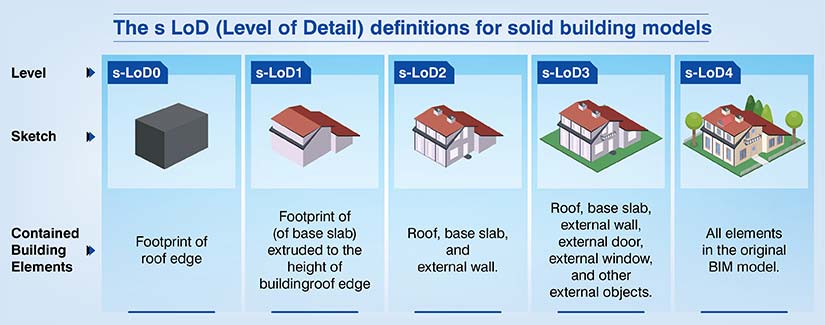 Level of Detail for 3D models
Level of Detail vs Level of Development
While Level of Detail refers to visual geometry, the Level of Development signifies the level of information depth and reliability of the model.
| Difference | Level of Detail (LOD) | Level of Development (LOD) |
|---|---|---|
| Definition | The extent of graphical or geometric information within a model. | A measure of the completeness of the model’s elements, plus associated documentation and data. |
| Focus | Primarily focuses on visual representation of model elements | Encompasses visual representation as well as non-graphical information such as specifications and data |
| Purpose | Helps communicate the appearance and shape of model elements | Provides a comprehensive understanding of the model’s development status. |
| Application | Commonly used in design and visualization stages. | Applied throughout the project lifecycle, from design to construction and operation. |
| Measurement Scale | Typically measured on a scale from LOD 100 (conceptual) to LOD 500 (as-built) | Usually measured on a scale from LOD 100 (basic) to LOD 500 (as-built) |
The importance of LOD in a BIM project
It is important for engineering consultants to know the role of LOD in a project. The Level of Development defines model reliability at various project stages.
Also, when all the stakeholders know how trustworthy the data is, it prevents rework and improves decision-making. When a clear LOD is defined, it augments coordination and simplifies material procurement for the overall cycle.
Understanding various LOD in BIM
There are various Levels of Development in BIM that set the framework to understand information depth in a 3D model.
Looking for accurate LOD 100–500 BIM modeling for your project?
Get reliable, standards-based models for every construction stage.
Success Story: A coordinated Revit model at LOD 400 saves construction time and costs.

An engineering and construction firm was working on a large airport project in the Middle East. The airport terminal project was vast including passenger terminals, office buildings, and multiple tiers.
When the team at HitechDigital received the inputs from the client, they found inconsistencies in sizes of ducts, pipes, etc. RFI’s were sent to clarify the doubts. The team began their work on the model by importing the 2D drawings into Revit.
3D MEP models were developed at LOD 400 and clashes were identified in Navisworks. After the conflicts were resolved in Revit, quantity takeoffs and coordinated drawings were extracted from the model.
When the deliverables were sent to the client, it led to:
- Cost and time savings.
- 100% terminal completion.
- Reduction in change orders.
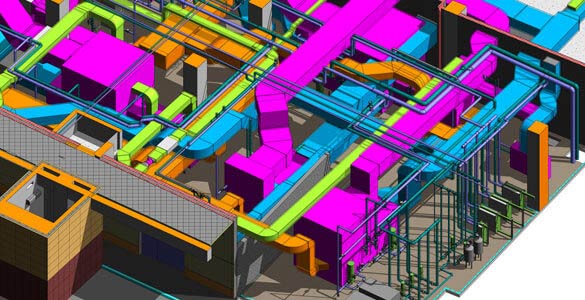 Airport Plantroom MEP System
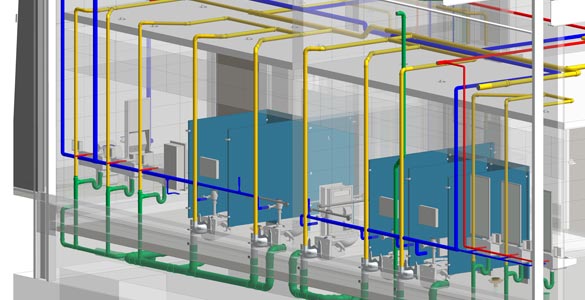 Drainage and Water Supply System
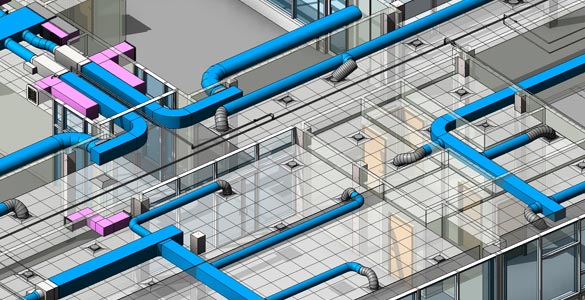 Office Building MEP System
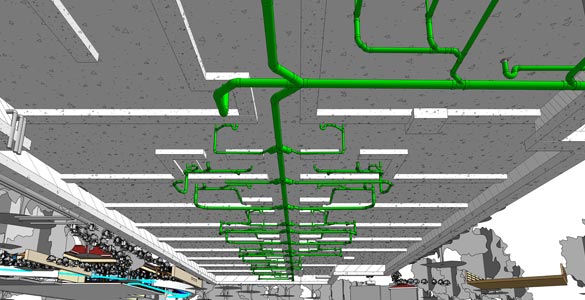 Under Ground Drainage System
Levels of BIM in Construction: Level 0 to Level 3 Explained
The Levels of BIM preferably 0-3 signify data sharing and collaboration maturity for a project. Various BIM levels measure how every team moves from 2D CAD levels (0) to cloud-based and integrated digital twins (3).
It is important to understand this progression as it is important to reduce data loss and improve cross-trade communication. Once this is achieved, stakeholders can get an interoperable construction framework.
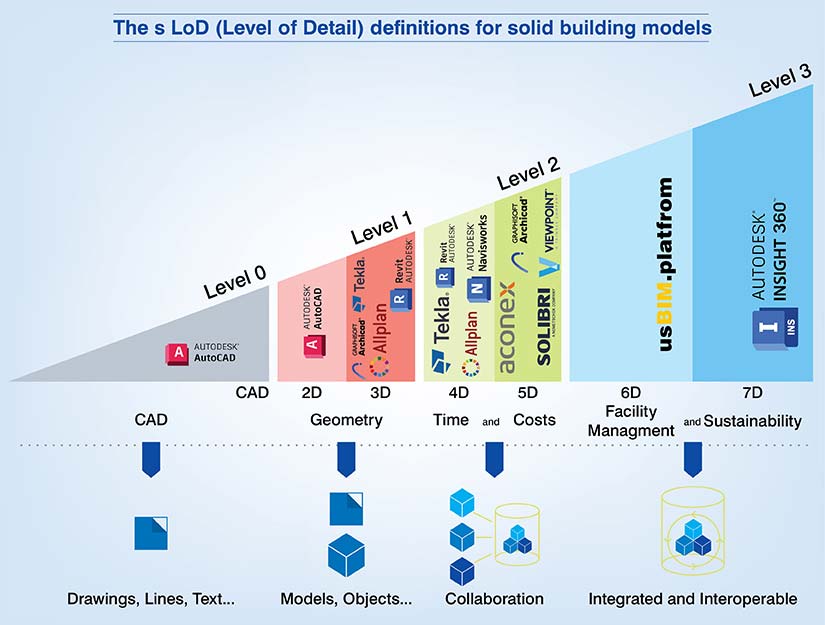 Various BIM levels
Role of Level of Detail in Revit
In Revit, the Level of Detail is a framework which controls graphical parameters and adds data reliability in BIM elements. It is managed using two distinct systems: Revit Detail Levels and Level of Development.
When you use Revit at a native level which is also the Detail Level setting in the View Control Bar, it processes and displays geometry. The three important Revit detail levels include:
- Coarse: Simplify elements into basic symbols or outlines to minimize computational load during early design.
- Medium: Show greater complexity including material layers in walls. For example. finish vs core along with major element boundaries.
- Fine: It renders all modeled sub entities which include nested hardware, sweeps, and fabrication-level connections.
Get clarity on detail and accuracy at each project stage.
Reduce conflicts with LOD specifications from LOD 100 – LOD 500.
How LOD impacts implementation and model performance
You need to manage LOD effectively to control model performance.
- Graphical override: Users can utilize the Family Editor to assign geometry for specific detail levels. More so, it ensures high-poly data does not get loaded in Coarse views.
- Template views: Your BIM manager can standardize LOD across various views simultaneously for consistent documentation across the set.
- Shared parameters: As Revit has no native LOD function or button, technical workflows require adding a shared parameter to monitor maturity levels for each component.
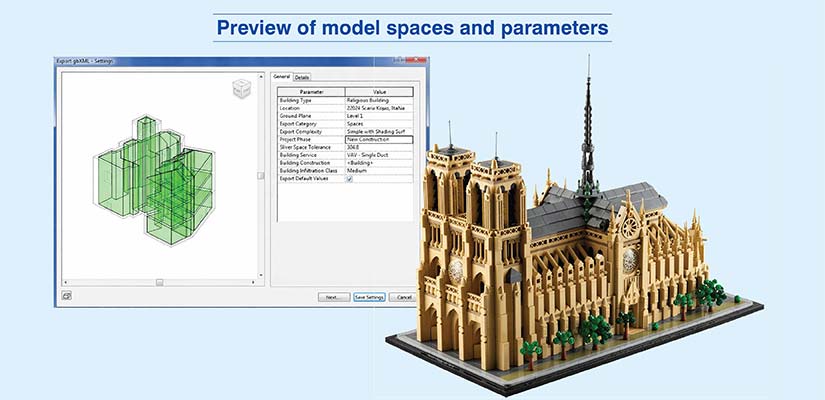 Preview of model spaces and parameters
Top 5 benefits of LOD in construction
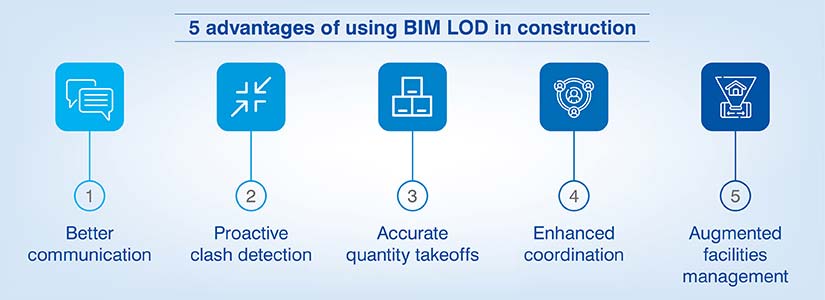
In the space of BIM, defining an LOD framework provides five operational and technical advantages.
- It delivers a common language for stakeholders and defines model reliability at any phase. This avoids misunderstandings when contractors depend on LOD 200 for accurate fabrication at LOD 400.
- When the models are at LOD 300/350, they incorporate precise geometry and support elements. This enables automated conflict detection and pinpoints spatial issues quickly rather than on the field.
- A model with a higher LOD ensures elements integrate dimensions and material data. This can help you enhance the precision of 5D BIM and reduce error margins in material procurement.
- When the project transitions from design to construction, LOD acts as a roadmap for engineering consultants and other stakeholders. It also ensures your fabrication team develops MEP systems with the right details for assembly and installation.
- An LOD 500 model mimics a digital twin with field-verified data and maintenance parameters. This helps owners use a robust database for asset management.
Challenges faced in implementing BIM LOD
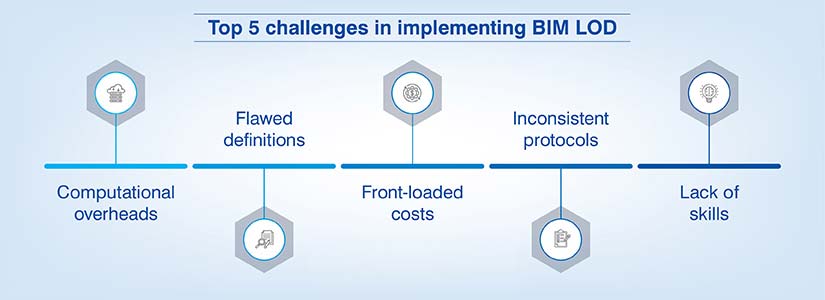
When you implement a standardized LOD framework, it can introduce multiple technical and procedural obstacles which affect project delivery.
- When elements are close to LOD 400, the file size increases exponentially. Dense metadata and high-poly geometry damage system performance, which leads to slower time synchronization and model crashes in Revit.
- Even if industry standards like AIA are incorporated, LOD is misinterpreted as being only Level of Detail (graphical) rather than data reliability. This leads to a grey area that creates assumptions for stakeholders.
- If you want to realize greater LOD levels, it requires a lot of man hours during preconstruction. Your firm can struggle to keep a balance between cost-intensive modeling vs legacy fee structures.
- Data can leak during transitions from one discipline to another. If the BEP does not explicitly define ownership of the element, it causes duplicate efforts.
- 3D modeling to LOD 350 or LOD 400 needs knowledge on construction assemblies. It even requires skill-sets on fabrication techniques. Many experts in your firm may understand the tools, but would lack field experience to create structural connections or MEP clearances.
Drive efficiency and excellence in your construction projects with detailed LOD.
Learn about our customized LOD solutions
What is the connection between BIM LOD and regulatory compliance?
There is a strong connection between the BIM LOD and regulatory compliance. Compliance becomes easier as code audit rules are already built into each specific LOD and errors are immediately flagged or blocked. So, an LOD 350+ model will help monitor and validate structural integrity, life-safety clearance and energy calculations which would be difficult without any specified LOD.
When your team documents accurate technical parameters, they are able to develop verified reports for permit approvals. This ensures the digital twin lines up with building mandates.
| Country | Regulations / Standards for BIM LOD |
|---|---|
| United States | AIA CAD Layer Guidelines, NBIMS-US |
| United Kingdom | UK BIM Level 2 Standards |
| European Union | ISO 19650 series, EU BIM Task Group standards |
| Singapore | BCA BIM e-submission standards |
| Canada | CAN/CSA ISO 19650, National BIM Standard – Canada |
| Australia | AEC (Architecture, Engineering, Construction) BIM standards |
| China | GB/T 19650, BIM standardization in the construction industry in China |
| Japan | JIS BIM series, Japan BIM Guidelines |
| Brazil | ABNT NBR 15965, Brazilian BIM Standards |
| South Africa | SANS 1922 series, South African BIM Standards |
| India | UAE BIM Standards |
| UAE | UAE BIM Standards |
| Germany | DIN SPEC 91400, German Standard for Information Delivery Specification |
Global guidelines for BIM at various LOD
The following table provides an in-depth view on guidelines for various Levels of Development. The US General Services Administration (GSA) uses Model Progression Matrix (MPM) and Approved Use Matrix to explain BIM model capabilities and reliability at each stage.
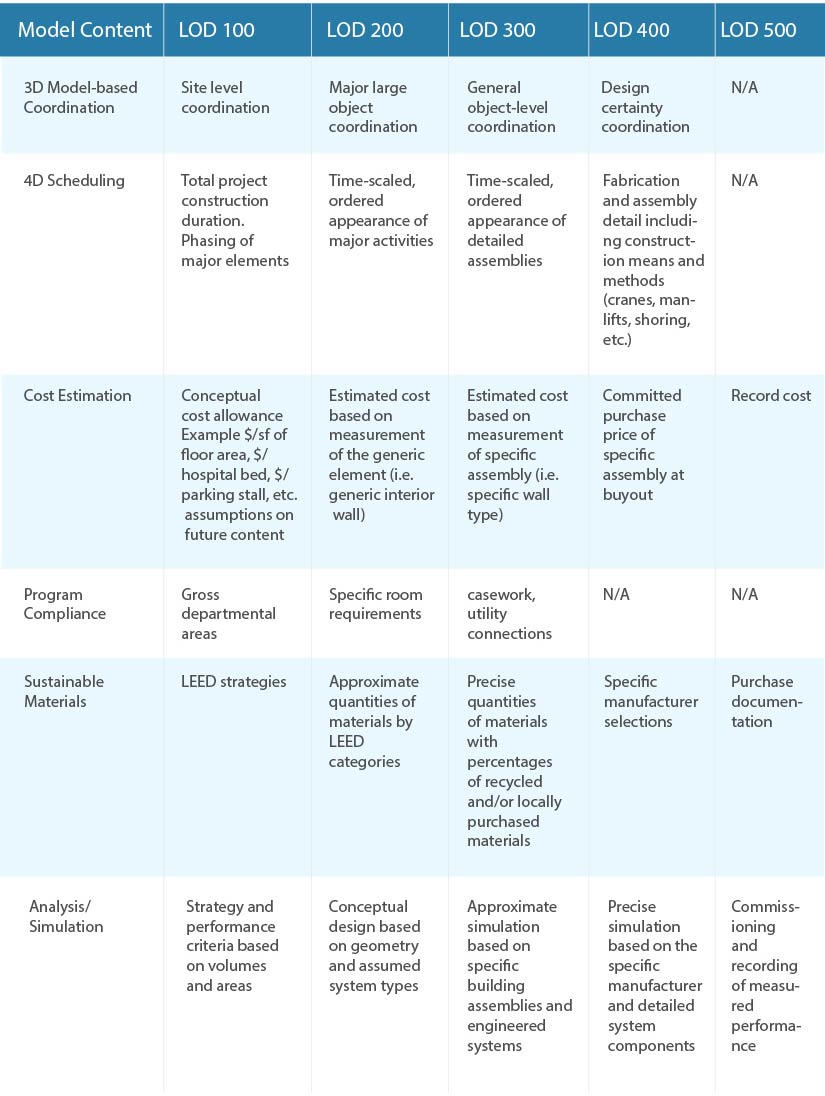 Source: Approved Use Matrix by U.S. General Services Administration
Need detailed LOD to enhance your BIM projects while saving time and money?
Revolutionize project management with tailored BIM solutions.
How does Level of Development (LOD) affect sustainable construction?
Engineering consultants need to consider sustainability in the early phases of design. A well-defined LOD improves sustainability based on material optimization and energy modeling.
When a model is at LOD 300+, precise geometry helps carbon footprint calculations and also waste reduction. Also, for aligning the digital twin to green building and sustainability standards you need to carry out thermal performance verification.
Conclusion
The Level of Development plays a very important role in 3D BIM modeling and construction workflows. Engineering consultants and other stakeholders have to be sure on what LOD has to be set for various project stages.
If you are unable to define the right LOD, then you should consult a BIM partner who can create a roadmap that clarifies these doubts. HitechDigital has worked with several clients who face similar problems. Remember, it is better to consult early or face repercussions like rework, delays, and elevated costs.
Don’t settle for guesswork. Optimize your project with required LOD.
Improve your project detailing with our BIM LOD services.